

⚡ eWeLink RC Capacitor — No-Neutral Smart Switch Component
Essential component for no-neutral WiFi smart switches. Eliminates LED flickering and ensures reliable operation when installing eWeLink touch switches in homes without neutral wiring at the switch box.
Free Delivery
Orders over R2,500
Local Stock
Ships from Gauteng
LED Flickering Fix
Clean switching
🔴 CRITICAL — Installation Warning
Installing the capacitor directly on the switch may damage or destroy the switch. The capacitor MUST be installed at the light fitting on the L1 circuit (e.g., on one of your downlight fittings). See wiring diagram included with your switch.
🛠️ What Does This Capacitor Do?
When you install a no-neutral smart switch (Live + Load wiring), the capacitor completes the circuit and provides a stable current path. This prevents:
- ✅ LED flickering or ghosting when the switch is turned off
- ✅ Switch not turning off completely (LEDs staying dimly lit)
- ✅ Unstable WiFi connection caused by insufficient current
- ✅ Touch panel not responding reliably
📦 What’s Included
- 1× eWeLink RC Capacitor (pre-wired with connection leads)
🔧 Compatible With
This capacitor is designed for use with eWeLink no-neutral smart switches, including:
- eWeLink WiFi Smart Touch Switch (1, 2, 3, 4 Gang — Black & White)
- eWeLink WiFi Dimmer Switch (no-neutral version)
- Any eWeLink-compatible switch marked “No Neutral Required”
💡 Note: Many eWeLink no-neutral switches already include a capacitor in the box. Only purchase this if you need a replacement capacitor or have lost the original.
⚙️ Installation Guide
Where to Install the Capacitor
- At the light fitting — NOT at the switch box
- Connect in parallel with the light load (across L1 and Neutral)
- For downlights: install on one of the downlight fittings
- For ceiling lights: install in the ceiling rose or light fitting enclosure
📄 Wiring Diagram: A complete wiring diagram is included with your eWeLink smart switch. Follow it carefully.
📋 Technical Specifications
| Product | eWeLink RC Capacitor |
| Type | Film capacitor with pre-wired leads |
| Voltage Rating | 250V AC |
| Compatibility | eWeLink no-neutral smart switches |
| Installation Location | At light fitting (NOT at switch) |
| Wire Leads | Pre-attached for easy installation |
❓ Frequently Asked Questions
Why do I need a capacitor for no-neutral switches?
No-neutral switches use a Live + Load wiring configuration (no neutral wire at the switch box). The capacitor creates a stable current path through the circuit, allowing the switch’s electronics to function properly and preventing LED flickering when the light is off.
Where exactly do I install this capacitor?
At the light fitting — connect it in parallel with your light load (across L1 and Neutral). For downlights, install it on one of the downlight fittings. For ceiling lights, install it in the ceiling rose. Never install it on the switch itself.
My switch already came with a capacitor. Do I need this?
No. Most eWeLink no-neutral switches include a capacitor in the box. Only purchase this if you need a replacement (damaged or lost original) or if your specific switch model didn’t include one.
Will this work with LED downlights?
Yes! The capacitor is specifically designed to work with LED lighting loads and eliminates the flickering/ghosting that can occur with LEDs when using no-neutral switches.
Can I use this with dimmable lights?
This capacitor is for on/off switches, not dimmers. If you have an eWeLink WiFi dimmer switch (no-neutral version), it should include its own capacitor rated for dimming applications.
What happens if I install it on the switch instead of the light?
Installing the capacitor directly on the switch can cause permanent damage to the switch electronics. Always install at the light fitting as shown in the wiring diagram.
Do I need an electrician to install this?
If you’re comfortable working with mains voltage (220-240V AC) and have installed the switch yourself, adding the capacitor at the light fitting is straightforward. However, if you’re unsure or not experienced with electrical work, always hire a qualified electrician. Working with mains voltage can be dangerous.
🔗 Related Products
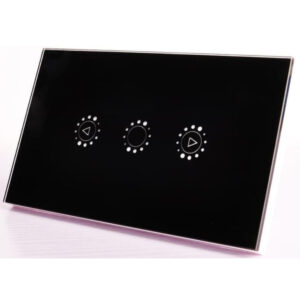
Sleek glass-panel WiFi switch. No neutral wire needed. Capacitor included in box. 1-4 gang. Black & White.
WiFi-controlled LED downlights. Perfect pairing with eWeLink switches. Dimmable options available.
🤝 Need Help? We’re Here for You!
📞 Call Us
Jesse: 071 678 8719
Jason: 084 505 7481
🏢 Visit Us
8 Wildebraam Street
Weltevreden Park, Roodepoort
Gauteng, 1709
Essential Component for No-Neutral Smart Switches
eWeLink RC Capacitor · Eliminates LED Flickering · Install at Light Fitting
Reviews
There are no reviews yet.